

Free online MIDI editor
Open, edit and create MIDI files in your browser
Open any .mid file and every part becomes an instrument track you can play, edit and mix. Change instruments, fix notes, split the drums, then export MP3, WAV or M4A, put the music under a video, or save a new MIDI file for any music app.
Free, no limits · No watermark · Works in Chrome and Edge on your computer
By signing in you agree to the Terms and conditions and Privacy policy. Signing in links basic usage, a short sample of each audio export (for content review), and a copy of each exported project file, to your Google or Apple account.
Everything you need to work with MIDI
A MIDI player, editor, mixer and converter in one browser tab.
-
Open any MIDI file
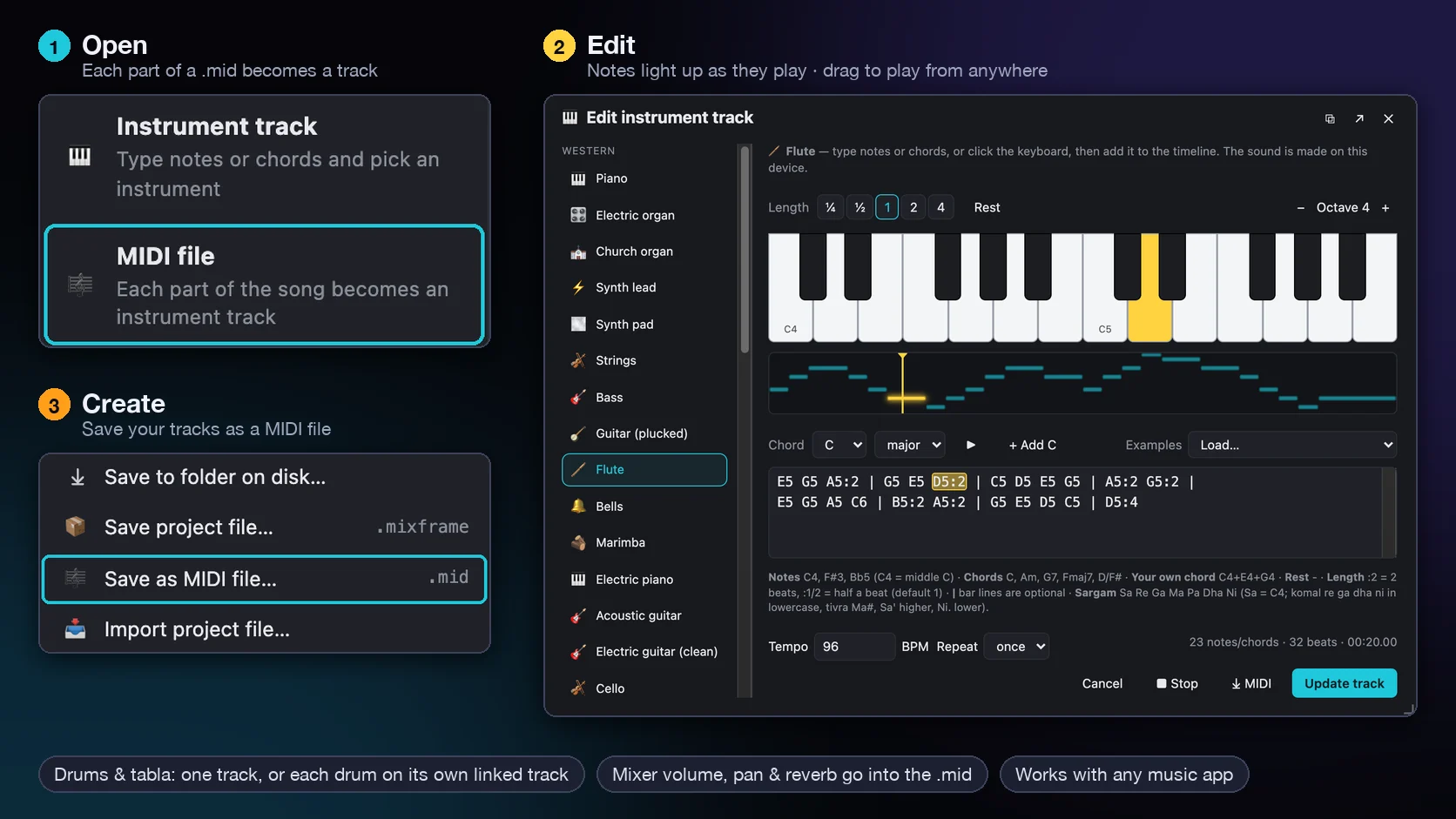
.mid and .midi files from + Add media → MIDI file, Import files, or dropped on the timeline. Every part lands on its own track, following the song’s tempo changes.
-
Edit the notes
Edit notes and chords as text or on a keyboard. While it plays, the keys and the note being heard light up in yellow; drag the yellow line to play from anywhere.
-
38 instruments
Hear each part on piano, strings, guitar, synths, brass, flute, or Indian instruments such as sitar, santoor and bansuri, and change any part to another instrument.
-
Drums on one track or split
General MIDI drums play on a drum kit. Keep the kit on one track, or put each drum on its own linked track so kick, snare and hats each get a mixer channel.
-
Mix it like a studio
Volume, pan, reverb, EQ and compressors on every track, add vocals or other audio, find or change the key, and hear exactly what you export.
-
MIDI to MP3, WAV or a new .mid
Export MP3, WAV or M4A with no watermark, use the music in a video, or Save as MIDI file with General MIDI instruments and the mixer’s volume, pan and reverb.
Edit a MIDI file in three steps
- Create an audio project and sign in with Google or Apple.
- Add your .mid file from + Add media → MIDI file (or drop it on the timeline), then edit notes, instruments and the mix.
- Export MP3, WAV or M4A, or choose Save as MIDI file… in the menu for a new .mid.
Questions
Is the MIDI editor free?
Yes, free with no limits: no trial, no export cap and no paid plan. Nothing you export has a watermark.
Can I convert MIDI to MP3 or WAV?
Yes. Open the MIDI file, choose the instruments you like, and export MP3, WAV or M4A. The sound is made on your own computer.
Can I make a new MIDI file?
Yes. Write music with instrument tracks (type notes and chords, or build beats on a drum grid), then choose Save as MIDI file… in the menu. Your tracks are saved as placed on the timeline, with General MIDI instruments and the mixer’s volume, pan and reverb, ready for any other music app.
What happens to the drums?
Drums on MIDI channel 10 play on a drum kit. You can keep the whole kit on one track or split it so every drum has its own linked track and mixer channel; editing any of them edits the whole kit.
Do I need to install anything?
No. The MIDI editor runs in your browser. Use a recent Chrome or Edge on a computer for the best experience.
Is my MIDI file uploaded?
No. Your files are opened and played on your own computer. A copy of each exported project file and a short audio sample are kept for content review, as explained in the privacy policy.
Ready to open your MIDI file?
Want to write music from scratch? Try the music composer, or the Mix & Frame video editor.